
Found 5 articles
Change Ubuntu 18.04 update source to mirror site in China
- Hank
- 16 Aug, 2019
## In China, Ubuntu might be slow to updateTo use ubuntu is not a easy thing, and if you are in China, it's even more difficult. Once you want to update your ubuntu. you'd find it's very slow. Because of some well known reason.So it's better to change the update source to some mirror site in China.Here are several famous mirror sites. What you need todo is pick one from below and edit `etc/apt/sources.list`, replace the content in this file.**Better backup you `etc/apt/sources.list` before you do this**### 163 (netease)_source:http://mirrors.163.com/_``` deb http://mirrors.163.com/ubuntu/ bionic main restricted universe multiverse deb http://mirrors.163.com/ubuntu/ bionic-security main restricted universe multiverse deb http://mirrors.163.com/ubuntu/ bionic-updates main restricted universe multiverse deb http://mirrors.163.com/ubuntu/ bionic-proposed main restricted universe multiverse deb http://mirrors.163.com/ubuntu/ bionic-backports main restricted universe multiverse deb-src http://mirrors.163.com/ubuntu/ bionic main restricted universe multiverse deb-src http://mirrors.163.com/ubuntu/ bionic-security main restricted universe multiverse deb-src http://mirrors.163.com/ubuntu/ bionic-updates main restricted universe multiverse deb-src http://mirrors.163.com/ubuntu/ bionic-proposed main restricted universe multiverse deb-src http://mirrors.163.com/ubuntu/ bionic-backports main restricted universe multiverse ```### alibaba (aliyun)_source:https://opsx.alibaba.com/mirror_``` deb http://mirrors.aliyun.com/ubuntu/ bionic main restricted universe multiverse deb http://mirrors.aliyun.com/ubuntu/ bionic-security main restricted universe multiverse deb http://mirrors.aliyun.com/ubuntu/ bionic-updates main restricted universe multiverse deb http://mirrors.aliyun.com/ubuntu/ bionic-proposed main restricted universe multiverse deb http://mirrors.aliyun.com/ubuntu/ bionic-backports main restricted universe multiverse deb-src http://mirrors.aliyun.com/ubuntu/ bionic main restricted universe multiverse deb-src http://mirrors.aliyun.com/ubuntu/ bionic-security main restricted universe multiverse deb-src http://mirrors.aliyun.com/ubuntu/ bionic-updates main restricted universe multiverse deb-src http://mirrors.aliyun.com/ubuntu/ bionic-proposed main restricted universe multiverse deb-src http://mirrors.aliyun.com/ubuntu/ bionic-backports main restricted universe multiverse ```And here are also two Chinese university mirror, use them only if you are in Chinese university.### tsinghua university``` deb https://mirrors.tuna.tsinghua.edu.cn/ubuntu/ bionic main restricted universe multiverse deb-src https://mirrors.tuna.tsinghua.edu.cn/ubuntu/ bionic main restricted universe multiverse deb https://mirrors.tuna.tsinghua.edu.cn/ubuntu/ bionic-updates main restricted universe multiverse deb-src https://mirrors.tuna.tsinghua.edu.cn/ubuntu/ bionic-updates main restricted universe multiverse deb https://mirrors.tuna.tsinghua.edu.cn/ubuntu/ bionic-backports main restricted universe multiverse deb-src https://mirrors.tuna.tsinghua.edu.cn/ubuntu/ bionic-backports main restricted universe multiverse deb https://mirrors.tuna.tsinghua.edu.cn/ubuntu/ bionic-security main restricted universe multiverse deb-src https://mirrors.tuna.tsinghua.edu.cn/ubuntu/ bionic-security main restricted universe multiverse deb https://mirrors.tuna.tsinghua.edu.cn/ubuntu/ bionic-proposed main restricted universe multiverse deb-src https://mirrors.tuna.tsinghua.edu.cn/ubuntu/ bionic-proposed main restricted universe multiverse ```### ustc (university of science and technology of China)``` deb https://mirrors.ustc.edu.cn/ubuntu/ bionic main restricted universe multiverse deb-src https://mirrors.ustc.edu.cn/ubuntu/ bionic main restricted universe multiverse deb https://mirrors.ustc.edu.cn/ubuntu/ bionic-updates main restricted universe multiverse deb-src https://mirrors.ustc.edu.cn/ubuntu/ bionic-updates main restricted universe multiverse deb https://mirrors.ustc.edu.cn/ubuntu/ bionic-backports main restricted universe multiverse deb-src https://mirrors.ustc.edu.cn/ubuntu/ bionic-backports main restricted universe multiverse deb https://mirrors.ustc.edu.cn/ubuntu/ bionic-security main restricted universe multiverse deb-src https://mirrors.ustc.edu.cn/ubuntu/ bionic-security main restricted universe multiverse deb https://mirrors.ustc.edu.cn/ubuntu/ bionic-proposed main restricted universe multiverse deb-src https://mirrors.ustc.edu.cn/ubuntu/ bionic-proposed main restricted universe multiverse ```Enjoy:)
Read More安装了梅林固件的路由器开启SSH以及超频
- Hank
- 21 Jun, 2020
部分路由器可以通过安装Merlin梅林固件来实现更多的自定义功能。安装更多第三方插件来让路由器变得更强大。在软件自定义的时候不妨试试将路由器进行硬件超频来使其拥有更强劲的性能。实现起来也非常简单,不过需要注意的是,超频可能会造成不可恢复的硬件损害,俗称变砖。超频前要三思,也不要妄图过分超频来让路由器硬件性能达到其不可能达到的等级。要超频需要先登入路由器命令行。推荐使用SSH。Windows下使用puttty等你熟悉的SSH工具,macOS则直接用终端即可。首先梅林默认是不开启SSH的。需要进入路由器管理界面——系统管理——SSH Daemon来开启。 设置如下:其中选项都非常清楚明白,按照个人所需设置即可。SSH key 可以让你登录的时候不用输入密码。也就是你登录路由器管理页面设置的密码。然后在putty或者终端里输入如下命令来登入路由器命令行。命令里的`用户名`是你在浏览器中登录路由器管理页面的用户名。``` ssh 用户名@192.168.50.1 ```一般梅林的默认路由器ip有两个,`192.168.2.1`或者`192.168.50.1`。根据你自己路由器的ip来更改以上命令登入。如果你没设置SSH key的话,接下来需要输入密码了。密码正确就进入路由器命令行了, 你会看到类似以下文字:``` ASUSWRT-Merlin [路由器型号] [梅林版本] Tue Sep 25 12:04:55 UTC 2018 [用户名]@[路由器型号]:/tmp/home/root# ```其中没有中文字的,这里只是说明这里字符代表的意思,你应该能看到你自己路由器的型号、版本、用户名等信息。接下来运行以下命令:``` nvram set clkfreq=1000,800 ```这里的1000是设置CPU频率,800是设置内存频率(800相当于1600)。不要改太大。一般建议CPU频率设置数值为默认频率加200就比较安全。性能也能得到较好提升。否则变砖甚至烧机得不偿失。然后运行以下命令来提交更改。``` nvram commit ```最后运行`reboot`来重启路由器。如果没什么问题,重启完成后路由器就超频成功了。有时候会遇到路由器亮两个红灯无法正常启动的情况,不要慌,这不是变砖,只是启动失败。刷了梅林之后会经常遇到启动失败的问题。这时候只要给路由器断电,等几秒,再次按电源键启动即可。如果还是启动不了就再重启一次。多试几次一般都能成功启动。实在不行只能重置。拿笔戳重置按钮30秒,然后继续按着重置按钮不动,重置电源启动30秒,再关闭电源30秒,最后再启动。传说中的`30-30-30`大法,重置成功就代表没变砖。
Read MoreHow to fix Git show all file as modified in WSL
- Hank
- 14 Jul, 2020
## SolutionIf you open your code in Windows, and run git in WSL bash, you will have a big chance to meet an issue that `git status` shows all your file get modified. To fix the issue, run this in WSL bash:```bash git config --global core.autocrlf true ```Normally I use OSX, but today I have to go back to my Windows PC to try an extension on Edge.I'm using WSL (that's Windows Subsystem for Linux) to manage and build my projects.After I cloned my repo from Github, I tried to create a new branch for Edge version. But after I ran `git branch branchname` , it told me that there were changes need to commit first.So I ran `git status`, to check what's been changed. Then I got this:This was a simple app. so it's basically showing that every file got modified. But I hadn't do anything to any file.It's because I was using git in WSL, but I opened files in Windows system. So the line ending is `CRLF`, but git thought it's on Linux so the line should ends with `LF`.So the fix command will tell git to use `CRLF` and line ending.
Read MoreChange Ubuntu 20.04 update source to mirror site in China
- Hank
- 13 Jul, 2020
Ubuntu 20.04 has been released for a while, its code is `Focal Fossa`. Again, if you are in China, better change the update source to mirror sites.This post is just a copy from [Change Ubuntu 18.04 update source to mirror site in China](https://momane.com/change-ubuntu-18-04-source-to-china-mirror), and I just replaced the source url from thoes ones of 18.04 to 20.04Here are several famous mirror sites. What you need todo is pick one from below and edit `etc/apt/sources.list`, replace the content in this file.There are some links beend commented out.- starts with`deb-src` is for source code, without them the speed would be even faster - the one with `focal-proposed` are just proposed updates, only enable them if you know the risk.**Better backup you `etc/apt/sources.list` before you do this**#### 163 (netease)_source:http://mirrors.163.com/_``` deb http://mirrors.163.com/ubuntu/ focal main restricted universe multiverse deb http://mirrors.163.com/ubuntu/ focal-security main restricted universe multiverse deb http://mirrors.163.com/ubuntu/ focal-updates main restricted universe multiverse deb http://mirrors.163.com/ubuntu/ focal-backports main restricted universe multiverse # deb http://mirrors.163.com/ubuntu/ focal-proposed main restricted universe multiverse # deb-src http://mirrors.163.com/ubuntu/ focal main restricted universe multiverse # deb-src http://mirrors.163.com/ubuntu/ focal-security main restricted universe multiverse # deb-src http://mirrors.163.com/ubuntu/ focal-updates main restricted universe multiverse # deb-src http://mirrors.163.com/ubuntu/ focal-proposed main restricted universe multiverse # deb-src http://mirrors.163.com/ubuntu/ focal-backports main restricted universe multiverse ```#### alibaba (aliyun)_source:https://opsx.alibaba.com/mirror_``` deb http://mirrors.aliyun.com/ubuntu/ focal main restricted universe multiverse deb http://mirrors.aliyun.com/ubuntu/ focal-security main restricted universe multiverse deb http://mirrors.aliyun.com/ubuntu/ focal-updates main restricted universe multiverse deb http://mirrors.aliyun.com/ubuntu/ focal-backports main restricted universe multiverse # deb http://mirrors.aliyun.com/ubuntu/ focal-proposed main restricted universe multiverse # deb-src http://mirrors.aliyun.com/ubuntu/ focal main restricted universe multiverse # deb-src http://mirrors.aliyun.com/ubuntu/ focal-security main restricted universe multiverse # deb-src http://mirrors.aliyun.com/ubuntu/ focal-backports main restricted universe multiverse # deb-src http://mirrors.aliyun.com/ubuntu/ focal-updates main restricted universe multiverse # deb-src http://mirrors.aliyun.com/ubuntu/ focal-proposed main restricted universe multiverse ```And here are also two Chinese university mirror, use them only if you are in Chinese university.#### tsinghua university``` deb https://mirrors.tuna.tsinghua.edu.cn/ubuntu/ focal main restricted universe multiverse deb https://mirrors.tuna.tsinghua.edu.cn/ubuntu/ focal-updates main restricted universe multiverse deb https://mirrors.tuna.tsinghua.edu.cn/ubuntu/ focal-backports main restricted universe multiverse deb https://mirrors.tuna.tsinghua.edu.cn/ubuntu/ focal-security main restricted universe multiverse # deb https://mirrors.tuna.tsinghua.edu.cn/ubuntu/ focal-proposed main restricted universe multiverse # deb-src https://mirrors.tuna.tsinghua.edu.cn/ubuntu/ focal main restricted universe multiverse # deb-src https://mirrors.tuna.tsinghua.edu.cn/ubuntu/ focal-updates main restricted universe multiverse # deb-src https://mirrors.tuna.tsinghua.edu.cn/ubuntu/ focal-backports main restricted universe multiverse # deb-src https://mirrors.tuna.tsinghua.edu.cn/ubuntu/ focal-security main restricted universe multiverse # deb-src https://mirrors.tuna.tsinghua.edu.cn/ubuntu/ focal-proposed main restricted universe multiverse ```#### ustc (university of science and technology of China)``` deb https://mirrors.ustc.edu.cn/ubuntu/ focal main restricted universe multiverse deb https://mirrors.ustc.edu.cn/ubuntu/ focal-updates main restricted universe multiverse deb https://mirrors.ustc.edu.cn/ubuntu/ focal-backports main restricted universe multiverse deb https://mirrors.ustc.edu.cn/ubuntu/ focal-security main restricted universe multiverse # deb https://mirrors.ustc.edu.cn/ubuntu/ focal-proposed main restricted universe multiverse # deb-src https://mirrors.ustc.edu.cn/ubuntu/ focal main restricted universe multiverse # deb-src https://mirrors.ustc.edu.cn/ubuntu/ focal-updates main restricted universe multiverse # deb-src https://mirrors.ustc.edu.cn/ubuntu/ focal-backports main restricted universe multiverse # deb-src https://mirrors.ustc.edu.cn/ubuntu/ focal-security main restricted universe multiverse # deb-src https://mirrors.ustc.edu.cn/ubuntu/ focal-proposed main restricted universe multiverse ```Enjoy:)
Read MoreFirefox offline installer official download page
- Hank
- 25 Aug, 2021
Why do I need offline installer of Firefox?Because its online installer is too slow. (Yes the installer that you download from its index page is online installer, basically it's just a downloader, that when you run it, it just downloads the offline installer and install it for you. If you don't feel it's slow, then you don't need to read this post.) And maybe the online installer even uses P2P so when it will also upload to others while installing.So in this [Firefox offline installer download page](https://www.mozilla.org/en-US/firefox/all/#product-desktop-release), you can pick any version for any OS to download the Firefox, like Firefox Developer Edition, Firefox Beta, for Mac, for Windows, fore Linux and even for Android mobile.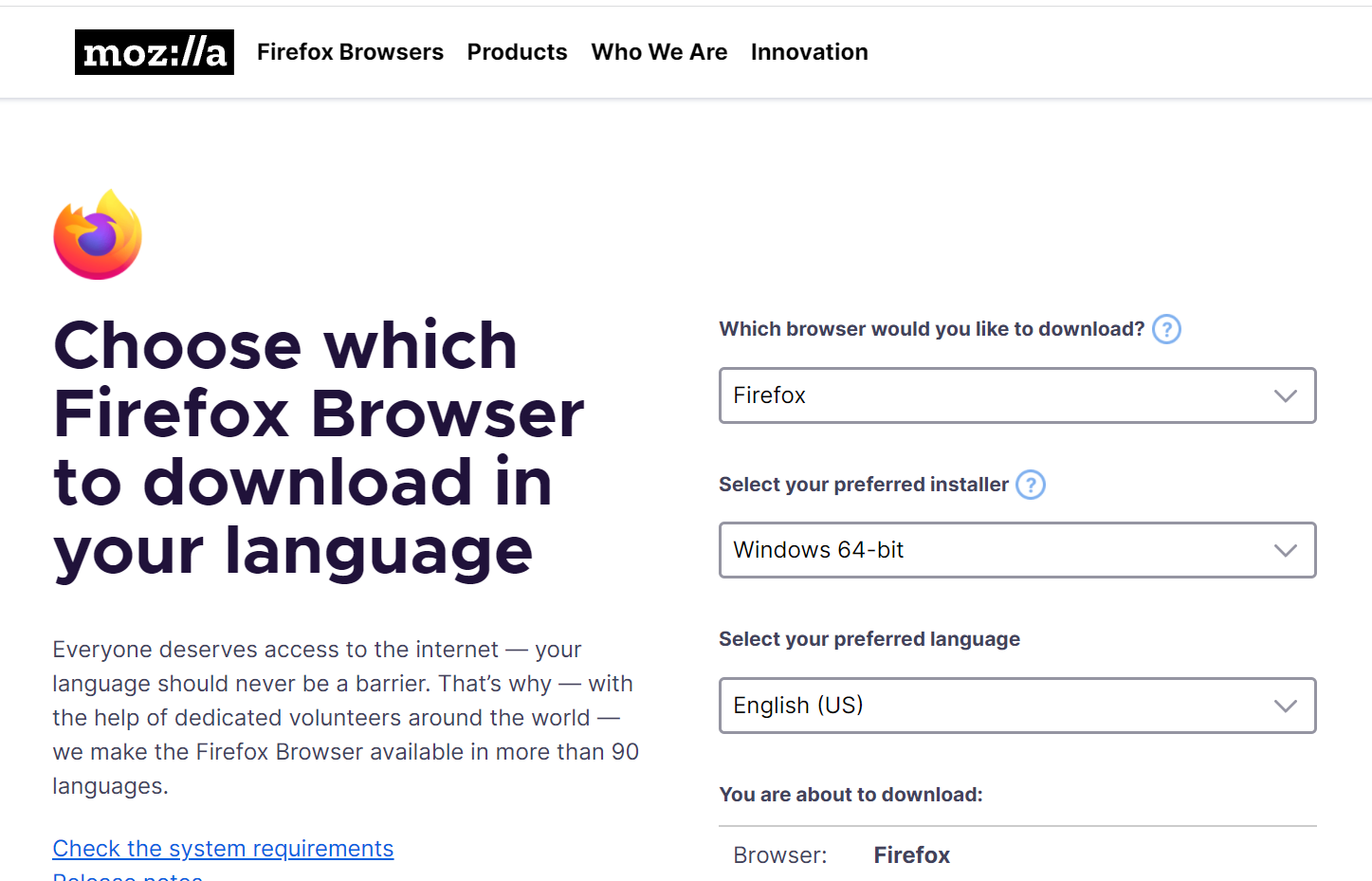And, here is also [Chrome release channels](http://www.chromium.org/getting-involved/dev-channel), where you can download several chrome versions, like Chrome Dev version, Beta, and Canary, for different OS.Like me, I like running different profile in different versions of Chrome and Firefox, because their icon are different ,easier than check the profile name in the top right corner.
Read More